
Web App vs Mobile App: Which Is Better for Your Business?
Should your business build a web app or a mobile app? Compare development costs, user experience, features, SEO opportunities, maintenance, and scalability to choose the right solution.
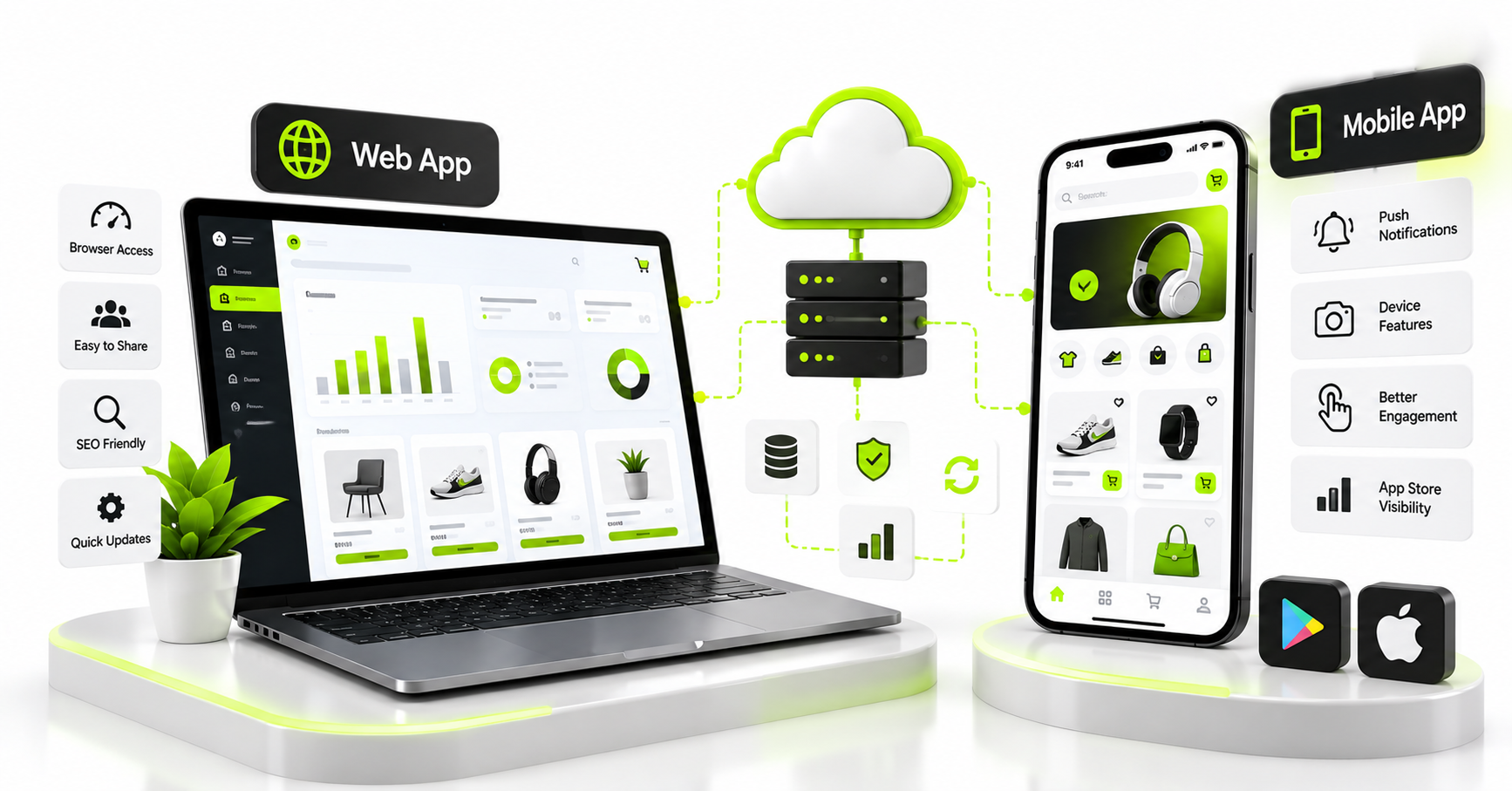
Choosing between a web app and a mobile app depends on how your customers use your product, which features your business needs, and how you plan to grow. A web application can be accessed through a browser, while a mobile application is installed on a device. Both can support customer accounts, payments, dashboards, and business workflows, but they offer different advantages.
For startups and established businesses, choosing the right approach can influence development costs, customer acquisition, maintenance, and the overall user experience. Building both from day one is not always necessary.
In this guide, we compare web apps and mobile apps, explain when each makes sense, and show how to make a practical decision for your business.
What is a web application?
A web application is software that users access through a web browser. Unlike a basic informational website, a web app lets users perform actions, manage information, and interact with business systems.
Examples include customer portals, online booking systems, CRM dashboards, project management tools, and e-commerce platforms.
Users typically access a web app through a URL without installing a traditional application. Depending on its design, it can work across desktops, tablets, and mobile browsers.
What is a mobile application?
A mobile application is designed to run on mobile devices, commonly through Android or iOS. Users typically install it from an app store or another supported distribution method.
Mobile apps can provide access to device capabilities such as push notifications, the camera, location services, and biometric authentication, subject to platform permissions and technical limitations.
Examples include shopping apps, delivery applications, fitness products, banking apps, and customer loyalty platforms.
Web app vs mobile app: Key differences
| Factor | Web application | Mobile application |
|---|---|---|
| Access | Usually accessed through a browser URL | Typically installed on a device |
| Installation | Usually no traditional installation required | Usually requires installation |
| Device features | Browser-dependent access to device capabilities | Can integrate more deeply with supported device features |
| Updates | Changes can be deployed centrally | Updates may require a new app release, depending on the change |
| Discovery | Can benefit from search engine indexing when pages are publicly accessible | Can be discovered through app stores and other marketing channels |
| Connectivity | Offline functionality requires deliberate implementation | Offline functionality also requires deliberate implementation |
| Maintenance | Browser compatibility, hosting, security, and backend upkeep | Backend upkeep plus device, OS, and app-release considerations |
| Best suited for | Dashboards, portals, internal systems, and browser-based workflows | Frequent mobile usage, device integrations, and app-centred experiences |
Neither option is automatically better. The right choice depends on your users, product requirements, and business objectives.
Web app vs mobile app: Which costs less?
Development cost depends on functionality rather than the product label alone. A web application with complex workflows, reporting, and integrations can cost more than a simple mobile app. A mobile app that supports two platforms and extensive device integrations may require more work than a basic web app.
Consider these cost factors when requesting proposals:
- Design: Number of screens, user journeys, and supported device sizes.
- Backend: Authentication, databases, business logic, and APIs.
- Platforms: Browser support, Android, iOS, or cross-platform development.
- Integrations: Payments, maps, messaging, inventory, and external services.
- Testing: Browser compatibility, device coverage, security, and performance.
- Maintenance: Hosting, updates, support, monitoring, and new features.
Request a separate estimate for each approach using the same features. This makes the comparison more meaningful than comparing two headline prices.
When should your business choose a web app?
A web application is often a practical starting point when customers or employees need access to information and workflows through a browser.
Choose a web app when:
- Your product is primarily a dashboard, portal, or management system.
- Users frequently work on laptops or desktop computers.
- You want to provide access through a shareable URL.
- You need to deploy interface updates centrally.
- Your business requires a public catalogue or content that can be indexed by search engines.
- You want to validate an idea before investing in separate mobile applications.
For example, a CRM used by sales teams may work well as a web application because employees need reports, data tables, filters, and detailed records on larger screens.
When should your business choose a mobile app?
A mobile app may be the better option when customers interact with your product frequently on their phones or when device capabilities are central to the experience.
Choose a mobile app when:
- Your customers use the product regularly throughout the day.
- Push notifications are important to the user journey.
- You need camera access, location services, or other device integrations.
- You want an app-centred experience for repeat purchases or customer engagement.
- The product has specific performance, offline, or platform integration requirements.
- Your audience expects an application distributed through app stores.
For example, a delivery application may benefit from mobile interfaces for customers and drivers, with location updates and delivery status notifications. The exact capabilities depend on permissions, operating-system restrictions, and implementation.
What about a Progressive Web App (PWA)?
A Progressive Web App combines web technologies with capabilities that can make a browser-based product feel more like an installed application. Depending on browser and operating-system support, a PWA may offer installation, caching, and certain offline features.
A PWA can be useful when you want one web-based product that is accessible through a URL and can also provide an app-like experience.
However, PWA capabilities are not identical across all browsers and devices. Access to background processing, notifications, and hardware features can vary. Check your target platforms before selecting this approach.
Can a business have both a web app and a mobile app?
Yes. Many businesses use a web application for administration and a mobile app for customers or field employees.
For example, an e-commerce business might use:
- A public website for product discovery and search visibility.
- A mobile app for repeat customers, account management, and order notifications.
- An admin dashboard for products, inventory, orders, and reporting.
- A shared backend to keep product, customer, and order data consistent.
When the systems are designed to use a common backend and suitable APIs, the same product records and business rules can support multiple interfaces. This reduces the need to maintain separate sources of truth.
However, each additional interface still needs implementation, testing, and maintenance. Plan the architecture before development rather than assuming that all channels will synchronise automatically.
Web app vs mobile app for startups
For startups, the best starting point is usually the approach that validates the business idea with the least unnecessary complexity.
If your product is a business dashboard, booking portal, or workflow tool, a web app may provide a practical first release. If the core experience depends on mobile usage, device features, or frequent notifications, a mobile app may be justified from the beginning.
Before committing to either approach, identify the primary user, the most important workflow, and the minimum functionality required to deliver value.
Start with essential features, collect feedback, and expand based on real usage. This helps prevent spending your initial budget on features that customers may not need.
How to make the right decision
Answer these questions before choosing your development approach:
- Will users primarily work on desktops, mobile browsers, or phones?
- Does the product depend on device features such as the camera or location?
- Are public pages and search engine visibility important?
- Do customers need an installed app and regular notifications?
- What is the initial budget and launch timeline?
- Will you need an admin dashboard or separate employee interface?
- Can the product use a shared backend across multiple channels?
- What will maintenance and future expansion require?
Use the answers to create a clear scope and ask development companies to explain the trade-offs of each suitable option.
How to choose a development partner
Your development partner should understand the business problem before recommending a technology. Ask for relevant examples, a clear feature list, an implementation plan, and a transparent breakdown of costs.
Confirm who will handle design, development, testing, deployment, security, and post-launch support. Also clarify source-code ownership, account access, third-party licences, and handover responsibilities.
Next Code Company helps businesses plan and develop digital products tailored to their operational requirements. Explore our portfolio and case studies to review relevant work, or discuss your web or mobile app project with NCC.
Frequently asked questions
Is a web app better than a mobile app?
Neither is universally better. A web app can be suitable for browser-based workflows, dashboards, and public content, while a mobile app may be preferable when the product depends on frequent mobile usage or device capabilities.
Can a web app work on mobile phones?
Yes. A responsive web app can adapt its layout to mobile screens and support many common tasks. Its access to device features and offline capabilities depends on browser support and implementation.
Is a mobile app necessary for an e-commerce business?
Not always. A responsive website may be sufficient initially. A mobile app can be useful when repeat purchases, notifications, or other app-specific features provide enough value to justify the additional investment.
Can I convert my website into a mobile app?
Possibly. The approach depends on your existing website architecture, APIs, required mobile features, and user experience. A developer should assess whether to reuse the backend, build a cross-platform app, or adapt selected web functionality.
Can both applications use the same database?
Yes, when the architecture is designed appropriately. A shared backend and APIs can serve both the web application and mobile app while applying consistent permissions and business rules.
Final thoughts
The choice between a web app and a mobile app should be based on the people using your product, the problem you are solving, and the capabilities your business needs.
A web app may be an effective starting point for browser-based workflows, while a mobile app can deliver value when mobile engagement and device integration are central to the experience. Some businesses will benefit from both, built around a shared backend.
Define your requirements, compare the total cost of each approach, and build the smallest solution that meets your business goals.
Contact Next Code Company to discuss your web application or mobile app development requirements.
Published October 11, 2026. This article is a general product-planning guide, not a project quotation or guarantee of development costs or outcomes.
Related articles

Have a story worth engineering?
We turn strategy into shipped software. Book a free consultation and we'll map the build, the timeline and the cost.