
Tiered Pricing for B2B: How a Bulk Pricing System Works
How tiered and bulk pricing works in B2B ordering: quantity tiers, minimum and maximum quantities, per-unit prices that drop as customers order more.
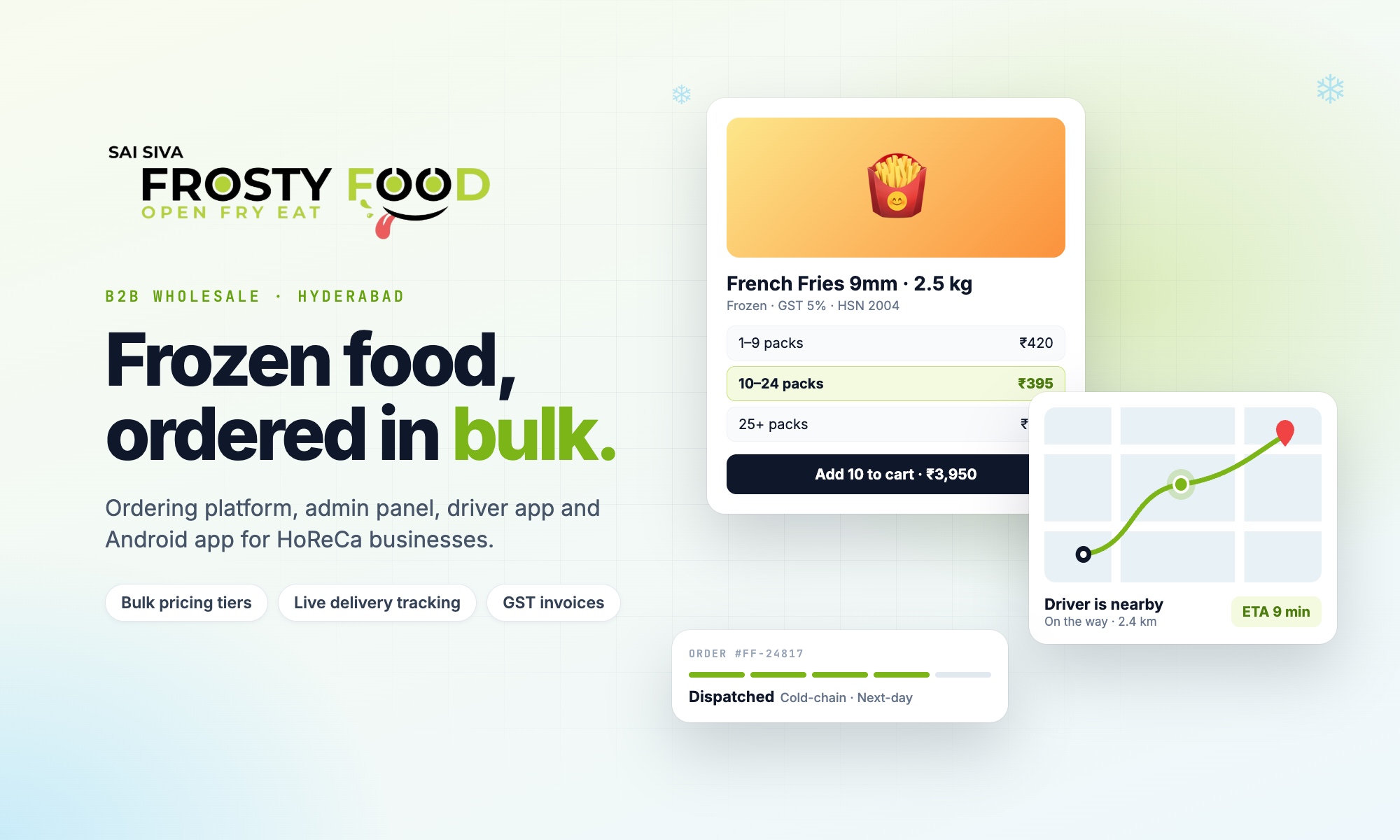
Tiered pricing means the unit price of a product changes with the quantity ordered: buy more, pay less per unit. It is the normal way wholesale and B2B businesses sell, and when it is built into an ordering app it removes one of the biggest sources of errors in distribution: working out bulk prices by hand.
This guide explains how tiered pricing works, the different models, how to show it so customers actually order more, and how we built it into the Frosty Food ordering platform in Hyderabad.
How tiered pricing works
Each product has a set of quantity bands, each with its own unit price. Here is a simple example (illustrative prices only):
| Quantity | Unit price | Saving vs base |
|---|---|---|
| 1–9 packs | ₹250 | — |
| 10–24 packs | ₹240 | 4% |
| 25–49 packs | ₹230 | 8% |
| 50–99 packs | ₹220 | 12% |
| 100+ packs | ₹210 | 16% |
A restaurant ordering 30 packs pays ₹230 per pack for all 30. If they add 20 more, the whole order drops to ₹220 per pack.
Tiered pricing models
| Model | How the price is calculated | Common in |
|---|---|---|
| All-units (volume) tiers | The whole quantity gets the price of the tier it reaches | Wholesale and distribution |
| Graduated tiers | Each band of units is priced separately, like tax slabs | SaaS and usage billing |
| Package tiers | Fixed price per pack of N units | Cartons and cases |
| Customer-specific prices | Negotiated price per account | Large key accounts |
For B2B ordering, all-units tiers are usually best: they are easy to explain, easy to check, and reward larger orders clearly.
Why published tiers beat negotiated quotes
- Fair: every buyer pays the same price at the same volume.
- Fast: no waiting for a quote; customers order at any hour.
- Fewer disputes: the price on the invoice is the price that was shown.
- Bigger orders: customers see exactly how many more units unlock the next price.
Frosty Food publishes up to five quantity tiers on every product, with no quotes, no negotiation and no minimum contracts. The deepest tiers sit on high-turnover kitchen staples.
How a B2B bulk pricing system works behind the scenes
In the Frosty Food platform, bulk pricing is controlled entirely from the admin panel. For each product, the admin sets a list of tiers, and each tier has three values:
| Tier setting | Meaning | Example |
|---|---|---|
| Minimum quantity | Where the tier starts | 10 packs |
| Maximum quantity | Where the tier ends (empty for the last tier) | 24 packs |
| Price per unit | Unit price inside this range | ₹240 |
From then on, the system does the work:
- The customer adds a product and the app finds the tier that matches the quantity.
- As they keep adding units, the quantity crosses into the next tier and the per-unit cost drops automatically, for the whole line.
- The cart shows the progress: the current tier, the saving against the base price, and how many more units unlock the next, cheaper tier.
- At checkout the server recalculates every line from the admin's tiers, so the price on the invoice always matches the published tiers.
- If the customer adds items to an order later, the quantities are re-tiered, so a larger total can reach a cheaper price.
The admin can change tiers at any time, for one product in the panel or for hundreds at once from an Excel sheet, and every customer sees the new prices immediately on the website and the app. Good setup rules keep it reliable: tiers start at quantity 1, ranges do not overlap, and each higher tier has a lower unit price.
Showing tiered pricing in an ordering app
- Show the tier table on every product page, with the unit price and saving for each band.
- Update the price as the customer types the quantity, in the product page and the cart.
- Show progress to the next tier: "Add 6 more to unlock the next bulk price."
- Celebrate the unlock when a tier is reached, and mark when the best price is applied.
- Offer a savings calculator on a bulk pricing page so buyers can plan larger orders.
- Show total savings at checkout and as a "bulk pricing discount" line on the invoice.
Rules to get right
- Verify prices on the server. The app may show the price, but the final calculation must happen on the server at checkout so nobody can change it from a browser.
- Apply minimums after tiers. Minimum order values and free-delivery thresholds should be checked on the goods value after bulk pricing, before GST.
- Keep GST separate. Tier prices are usually before tax; GST is calculated per line on the final taxable value.
- Bulk-edit tiers. With hundreds of products, staff need to upload tiers from Excel rather than editing each product.
- Report the savings. Track how much bulk discount was given, so you know what tiers are costing and earning.
Frequently asked questions
Is tiered pricing the same as volume discount?
Mostly. A volume discount usually refers to the all-units model, where the whole order gets a lower price once it crosses a quantity.
How many tiers should a product have?
Three to five is enough for most products. More tiers make the table harder to read without changing buying behaviour much.
Can tiered pricing work alongside coupons?
Yes, with clear rules: for example, coupons with a minimum order value, an expiry date and a maximum discount, applied after tier prices.
Want tiered pricing in your B2B ordering app or distributor management system? Book a free consultation with Next Code Company.
Related articles
Have a story worth engineering?
We turn strategy into shipped software. Book a free consultation and we'll map the build, the timeline and the cost.