
Distributor Management System: Modules, Features and How to Build One
What a distributor management system does, the modules distributors need, from bulk pricing to GST invoices and delivery tracking, with a real Hyderabad example.
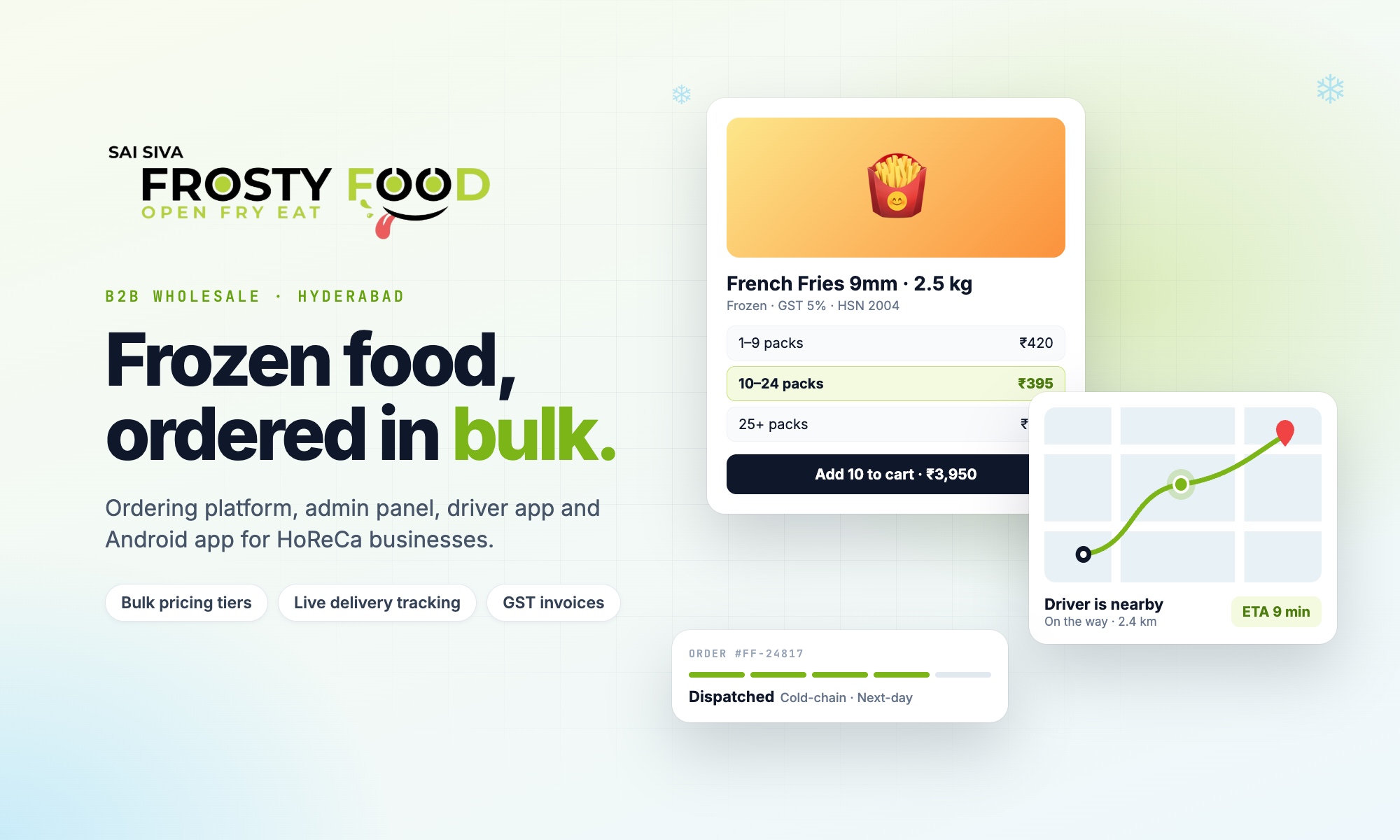
A distributor management system is the software a distributor or wholesaler uses to take orders from retailers and businesses, price them correctly, collect payment, dispatch deliveries and see what is happening across the whole operation. For many Indian distributors that work still runs on phone calls, WhatsApp messages, Excel sheets and a lot of memory.
This guide explains what a distributor management system does, the modules it needs, which features make the biggest difference, and how to decide between ready-made software and a custom build. We use a real platform we built, Frosty Food, a frozen-food distributor in Hyderabad supplying hotels, restaurants and cafés, as a worked example throughout.
What is a distributor management system?
A distributor management system (often shortened to DMS) connects the three groups involved in every wholesale order:
- Customers (retailers, restaurants, hotels, shops) who browse the catalogue and place orders.
- The distributor's team (owners, store managers, accounts staff) who confirm payments, pack orders and manage stock and prices.
- Delivery staff who take the goods to the customer and confirm the handover.
A good DMS replaces scattered calls and spreadsheets with one system where every order has a clear status, every price is calculated the same way, and every rupee is accounted for.
Signs your distribution business needs one
- Orders arrive on WhatsApp and phone, and some are missed or entered twice.
- Staff work out bulk prices by hand, so two customers can pay different prices for the same quantity.
- You cannot tell a customer where their delivery is without calling the driver.
- Payments made by bank transfer are hard to match to orders.
- GST invoices are made separately, after the order, and take time to get right.
- Only the owner knows the full picture: which products sell, which customers owe money, which deliveries failed.
Core modules of a distributor management system
These are the modules we built for Frosty Food. Most distributors need a version of each.
1. Business customer accounts and approval
Wholesale is not open retail. Businesses sign up with their GST number and contact details, and the distributor can approve, review or block each account. Staff see a customer's full buying history, saved delivery addresses and private notes in one place.
2. Catalogue with bulk (tiered) pricing
Products are organised by category and brand, with pack sizes and photos. Each product carries quantity-based price tiers: the more a customer orders, the lower the unit price. In Frosty Food, every product has up to five published tiers and the cart moves between them automatically, showing how many more units unlock the next price. We explain this in detail in our guide to tiered pricing for B2B ordering.
3. Cart and checkout with business rules
Checkout applies the rules a distributor actually works with: minimum order values, a free-delivery threshold, same-day and next-day delivery with daily cut-off times, and store pickup with opening hours and a pickup lead time. Every price is verified again on the server at checkout, so nobody can change a price from their browser.
4. Payments for the Indian B2B market
Business customers pay in different ways, so the system supports several:
- Online payment through a gateway (Razorpay: cards, netbanking, wallets).
- Direct UPI (Google Pay, PhonePe, Paytm) without gateway charges.
- Bank transfer (NEFT / RTGS / IMPS), where the customer uploads a payment screenshot and an administrator confirms it before the order goes ahead. Orders with no screenshot are cancelled automatically after 24 hours.
- A credit line for trusted customers, and cash collected on delivery, with tracking of when cash is handed over.
5. GST-compliant invoicing
Each product carries its HSN code and GST rate, and invoices show an HSN-wise tax summary with the correct CGST and SGST or IGST split. The invoice is generated from the order itself, so there is no separate billing step.
6. Order management and fulfilment
Every order moves through clear stages: placed, payment confirmed, packed, dispatched to a driver (or ready for pickup), on its way, items verified by the customer, delivered. Customers can add items to an order after placing it, reorder past orders in one tap, and request a replacement if something is wrong.
7. Delivery management and driver app
Administrators assign orders to drivers. Drivers use a mobile-friendly app that shares their GPS location, so customers see when the driver is nearby, arriving and has arrived. Delivery areas and free-delivery zones are drawn directly on a map. Read more in our guide to delivery management software for distributors.
8. Multiple stores and staff roles
Each store has its own address, map location, opening hours and manager. Staff accounts get specific roles, and access is checked on the server for every action, so removing a role removes the access immediately.
9. Bulk product import
Distributors carry hundreds of products. Instead of typing them in one by one, staff upload an Excel or CSV sheet (products, prices, tiers, HSN codes, stores, drivers) plus a zip of product photos named by product code. The system checks every row and reports problems before anything is saved.
10. Notifications, feedback and reports
- Push notifications to the Android app and to browsers when an order is packed, dispatched and delivered.
- Ratings for products, drivers and the delivery experience, and short product feedback questions ("Would you order this again?") that show which products customers really like.
- Reports on sales, product performance, bulk savings given and payments outstanding, with spreadsheet downloads.
- A holiday mode that pauses ordering across the website and app with one switch.
Features that make the biggest difference
| Feature | Problem it removes |
|---|---|
| Automatic bulk price tiers | Manual price calculations and pricing disputes |
| Server-side price checks | Wrong or tampered prices reaching an invoice |
| Payment screenshot verification | Unmatched bank transfers and unpaid orders being dispatched |
| Live driver tracking | "Where is my order?" phone calls |
| Map-based delivery zones | Orders from areas you cannot serve, and arguments about delivery charges |
| GST invoices from the order | Separate, error-prone billing |
| Excel bulk import | Days of manual catalogue entry |
Ready-made software or a custom distributor management system?
Ready-made DMS products are quick to start and work well when your process is standard. A custom system makes sense when:
- Your pricing has rules generic software cannot express (tiers per product, zone-based delivery charges, customer-specific terms).
- You want your own branded website and Android app, not a shared marketplace.
- Per-user or per-order licence fees grow faster than your margins.
- You need the system to fit your existing stores, payment methods and delivery partners.
Our article on custom vs off-the-shelf software covers this decision in more depth.
How we approach a distributor management system build
- Map the current process: how orders, prices, payments and deliveries work today, including the exceptions.
- Agree the first release: ordering, pricing, payments and invoices usually come first; tracking, ratings and reports can follow.
- Build web, admin and driver apps together on one database, so every screen shows the same truth.
- Import your catalogue and customers from your existing sheets.
- Launch, train staff and improve from real orders.
Frequently asked questions
What is the difference between a DMS and an ERP?
An ERP covers the whole company (accounts, purchasing, HR, production). A distributor management system focuses on the sales side of distribution: customer ordering, pricing, payments, invoicing and delivery. Many distributors run a DMS alongside their accounting software.
Can customers order from a mobile app?
Yes. Frosty Food's customers order from the website or the Android app on Google Play, and both use the same catalogue, prices and order history.
How much does a distributor management system cost to build?
It depends on the modules in the first release, the number of apps (customer, admin, driver) and the integrations. See our custom software development cost guide for typical budgets, or book a free consultation for a written quote.
Can it work for distributors outside food?
Yes. The same modules suit FMCG, pharma, building materials, auto parts and any business that sells to other businesses in bulk.
Planning a distributor management system for your business? Talk to Next Code Company: we will map your process and show you what a first release could include.
Related articles
Have a story worth engineering?
We turn strategy into shipped software. Book a free consultation and we'll map the build, the timeline and the cost.