
How Much Does It Cost to Run an App in India? Complete Annual Expense Breakdown
Understand the actual cost of running a mobile or web application in India. Explore Hostinger hosting, Cashfree payment gateway charges, Google Play and Apple Developer fees, SMS, DLT registration, maps, and other third-party expenses with a practical first-year cost breakdown.
Developing an application is only one part of launching a digital product. Once your application is ready, you need hosting, databases, domain registration, notifications, OTP services, payment gateway integration and other third-party services to keep it running.
One of the most common questions business owners ask is: How much does it actually cost to run an application every year?
The answer depends on the application's features, number of users, server requirements, transactions and third-party integrations. A simple business application may have relatively low operational expenses, while a high-traffic marketplace, fintech platform or delivery application may require a considerably larger budget.
In this guide, we break down the expenses involved in running an application in India. We separate recurring one-year expenses from one-time setup costs and usage-based charges, so you can understand what you need to budget for.
1. What Are the Main Expenses Involved in Running an App?
Most applications require a combination of the following services:
- Web hosting or cloud VPS server
- Database and backend infrastructure
- Domain registration and renewal
- Google Play Console registration
- Apple Developer membership
- SMS and OTP verification services
- DLT registration for commercial SMS in India, where applicable
- Payment gateway charges
- Maps and location APIs, if required
- Email and push notification services
- File storage, image storage and backups
Not every application needs every service. Your actual technology architecture and business requirements determine which services are necessary.
2. Hosting Cost: Hostinger Web Hosting vs VPS
Your application needs a server or hosting environment to make its backend and website accessible. The right hosting option depends on the application's technical requirements.
Option A: Hostinger Business Web Hosting
Hostinger Business Web Hosting can be suitable for certain websites, content-driven applications and projects that fit within its supported hosting environment.
It can be an economical starting point when your application does not require dedicated server resources or advanced server-level configuration.
However, check the supported programming languages, background processes, resource limits and deployment requirements before choosing a shared hosting plan for an application backend.
Explore Hostinger hosting plans. The referral link may provide a 20% discount and a free domain on eligible purchases. Offers and eligibility can change, so verify the checkout price.
Option B: Hostinger VPS Hosting
A Virtual Private Server (VPS) provides more control over the server environment. It can be suitable for applications built using Node.js, PHP, Laravel and other backend technologies that need custom configurations.
With a VPS, you are generally responsible for server setup, deployment, security configuration, monitoring and backups.
Explore Hostinger VPS Hosting.
Important: Web hosting and VPS hosting are alternatives in this estimate. You do not need to purchase both automatically. Choose according to your application's architecture.
3. Database Cost: Supabase
Applications need a database to store information such as user accounts, product details, orders, transactions, bookings and other business records.
Supabase provides managed PostgreSQL databases along with services such as authentication, storage and APIs.
Its paid Pro plan starts at approximately US$25 per month, subject to current pricing, included allowances and additional usage charges.
For estimation purposes, assuming an exchange rate of ₹90 per US dollar:
- Estimated monthly subscription: ₹2,250
- Estimated one-year subscription: ₹27,000
Your actual bill can vary depending on compute, storage, bandwidth and other usage. Supabase is not compulsory. You can also use a database hosted on your own VPS or another managed database provider.
4. Domain Registration Cost
A domain name gives your application or business website its own online address, such as yourcompany.com.
Domain prices depend on the extension, registrar and renewal pricing. For this example, we are using an estimated annual budget of ₹1,000.
Remember that introductory registration prices and renewal prices can differ.
5. Google Play Console Registration
If you want to publish your Android application on the Google Play Store, you need a Google Play Console developer account.
Google charges a one-time registration fee of US$25. Using an illustrative exchange rate of ₹90 per US dollar, this is approximately ₹2,250.
This is a one-time registration expense, not an annual subscription.
Read our Google Play Console registration guide.
6. Apple Developer Program Membership
If you want to distribute your application through Apple's App Store, you generally need an Apple Developer Program membership.
The standard membership fee is US$99 per year. At an illustrative exchange rate of ₹90 per US dollar, this is approximately ₹8,910 per year, before any applicable taxes or currency conversion differences.
Unlike Google Play Console registration, this is a recurring annual membership fee.
Read our Apple Developer Program registration guide.
7. SMS and OTP Verification Cost – MSG91
Applications that require mobile number verification, login OTPs, transaction alerts or SMS notifications need an SMS service provider.
MSG91 is one option for integrating OTP and SMS services into an application.
SMS costs depend on the provider's current rates, message category, route, volume and applicable taxes.
For an illustrative calculation, assume:
- 5,000 SMS messages per month
- Assumed rate: ₹0.25 per SMS
- Estimated monthly cost: ₹1,250
- Estimated one-year cost: ₹15,000
This is only a sample calculation. It is not a confirmed MSG91 quotation. Check the provider's current pricing before budgeting.
What Is DLT Registration?
In India, businesses sending applicable commercial SMS messages need to follow the relevant telecom DLT requirements. Depending on the use case, this may involve registering the principal entity, headers and message templates.
For our example, we have included an illustrative one-time DLT registration budget of ₹5,000 plus assumed 18% GST, totalling ₹5,900. Actual charges and registration requirements depend on the service provider and applicable rules.
Read our MSG91 DLT registration guide and check the MSG91 DLT FAQs.
8. Payment Gateway Charges – Cashfree
If your application accepts online payments, you may need a payment gateway to process transactions.
Cashfree Payments provides payment gateway services for businesses. Its charges depend on the payment method, merchant agreement, transaction volume and applicable pricing terms.
Unlike hosting or a fixed annual membership, payment gateway charges are generally linked to the transactions processed.
Illustrative Payment Gateway Calculation
Assume your application processes ₹10,00,000 in payments during a year and the applicable gateway fee is 1.95%.
- Annual transaction volume: ₹10,00,000
- Assumed gateway fee: 1.95%
- Estimated gateway charges: ₹19,500
- Illustrative 18% GST on the fee: ₹3,510
- Total illustrative gateway charges: ₹23,010
This is an example calculation, not a guaranteed Cashfree rate. Check the latest Cashfree pricing and your merchant agreement.
Payment gateway charges are excluded from the main first-year cost calculator below because they depend on your actual transaction volume.
9. Maps and Email Services
Maps and Location APIs
Delivery applications, taxi booking platforms, property marketplaces and location-based services may need maps, geocoding, directions or distance calculations.
Google Maps Platform pricing depends on the APIs used, billing category, usage and any applicable free usage limits. For planning purposes, our example includes an allowance of ₹500 per month, or ₹6,000 per year. This is a budget assumption, not a quoted Google Maps price.
Check the Google Maps Platform pricing for India.
Email Services
Applications may use email services for registration confirmations, password resets, invoices, transactional updates and account notifications.
Some providers offer free tiers, while paid plans depend on delivery volume and features. We have included an illustrative allowance of ₹3,000 per year for email services in the calculator.
10. Storage and Backup Costs
Every application that allows users to upload or access files needs a storage strategy. This may include profile pictures, product images, documents, invoices, videos and other business files.
Storage and backups are important because your application must not only store information but also protect it against accidental deletion, server failure or other data-loss situations.
Supabase Storage
If you use Supabase, you can store files such as images, documents and other user uploads through Supabase Storage.
Your storage expenses depend on the selected plan, included storage allowance, additional storage, file downloads and bandwidth usage.
For smaller applications, the included storage allowance may be sufficient. As the number of users and uploaded files increases, additional charges may apply.
Check the Supabase pricing page for current storage and bandwidth limits.
VPS Storage and Backups
If your application runs on a VPS, you need to consider the disk space used by application files, uploaded media, database files, logs and backups.
Depending on your hosting configuration, you may need additional storage or a separate backup solution.
- Application files: Source code, uploaded documents and other application assets.
- Database backups: Copies of important database records that can be restored if data is lost or corrupted.
- Media backups: Copies of images, documents and other uploaded files.
- Backup retention: How long you retain previous backup copies.
- Bandwidth: Data transferred when users upload or download files.
Some hosting providers include backup features in selected plans, while others charge separately. Always check the included backup frequency, retention period and restoration options.
Important: A backup stored only on the same server may not protect your data if that server becomes unavailable. For important applications, consider maintaining a separate backup location.
There is no universal storage or backup price. It depends on your file volume, retention requirements and provider. These additional costs are not separately quantified in our example calculator.
11. Push Notification Costs – Firebase Cloud Messaging
Push notifications allow applications to send messages directly to users' devices. They are commonly used for order updates, booking confirmations, reminders, promotional alerts and important account notifications.
Firebase provides Firebase Cloud Messaging (FCM), a service that allows developers to send push notifications to Android, iOS and web applications.
Is Firebase Cloud Messaging Free?
Firebase Cloud Messaging is generally available at no charge for sending messages. This makes it a useful option for businesses that want to implement standard push notifications without paying a per-notification messaging fee.
However, other Firebase products or connected services may have separate pricing depending on usage. For example, database, storage or other cloud resources may have their own limits and charges.
What Do You Need to Set Up Push Notifications?
- Create or configure a Firebase project.
- Register your Android, iOS or web application.
- Configure the required application credentials.
- Integrate Firebase Cloud Messaging into the application.
- Implement the backend logic to trigger notifications.
The development team can help configure and integrate the notification service. The business should retain ownership of its Firebase project and associated billing arrangements.
For many applications, standard push notification delivery through FCM does not require a separate per-message budget. However, any additional services used alongside it may incur charges.
12. Complete Application Running Cost Calculator
Let's combine the estimated expenses into two separate categories: recurring costs for one year and one-time setup costs.
The following estimate represents one possible application architecture. It assumes a Hostinger VPS and Supabase Pro are both used. These are not compulsory together, and your actual costs will depend on the infrastructure you select.
What Will It Cost to Run Your App?
Illustrative first-year application expense breakdown · India
One-year costs
Expenses payable monthly or annually
| Hostinger VPS₹1,199 × 12 months | ₹14,388 |
| Supabase Pro₹2,250 × 12 months | ₹27,000 |
| Domain registrationEstimated annual renewal | ₹1,000 |
| Apple Developer membershipAnnual membership estimate | ₹8,910 |
| MSG91 OTPIllustrative 5,000 SMS per month | ₹15,000 |
| Maps APIEstimated usage allowance | ₹6,000 |
| Email servicesEstimated annual allowance | ₹3,000 |
One-time costs
Initial registration and setup expenses
| Google Play ConsoleOne-time developer registration | ₹2,250 |
| DLT registrationIllustrative amount including assumed GST | ₹5,900 |
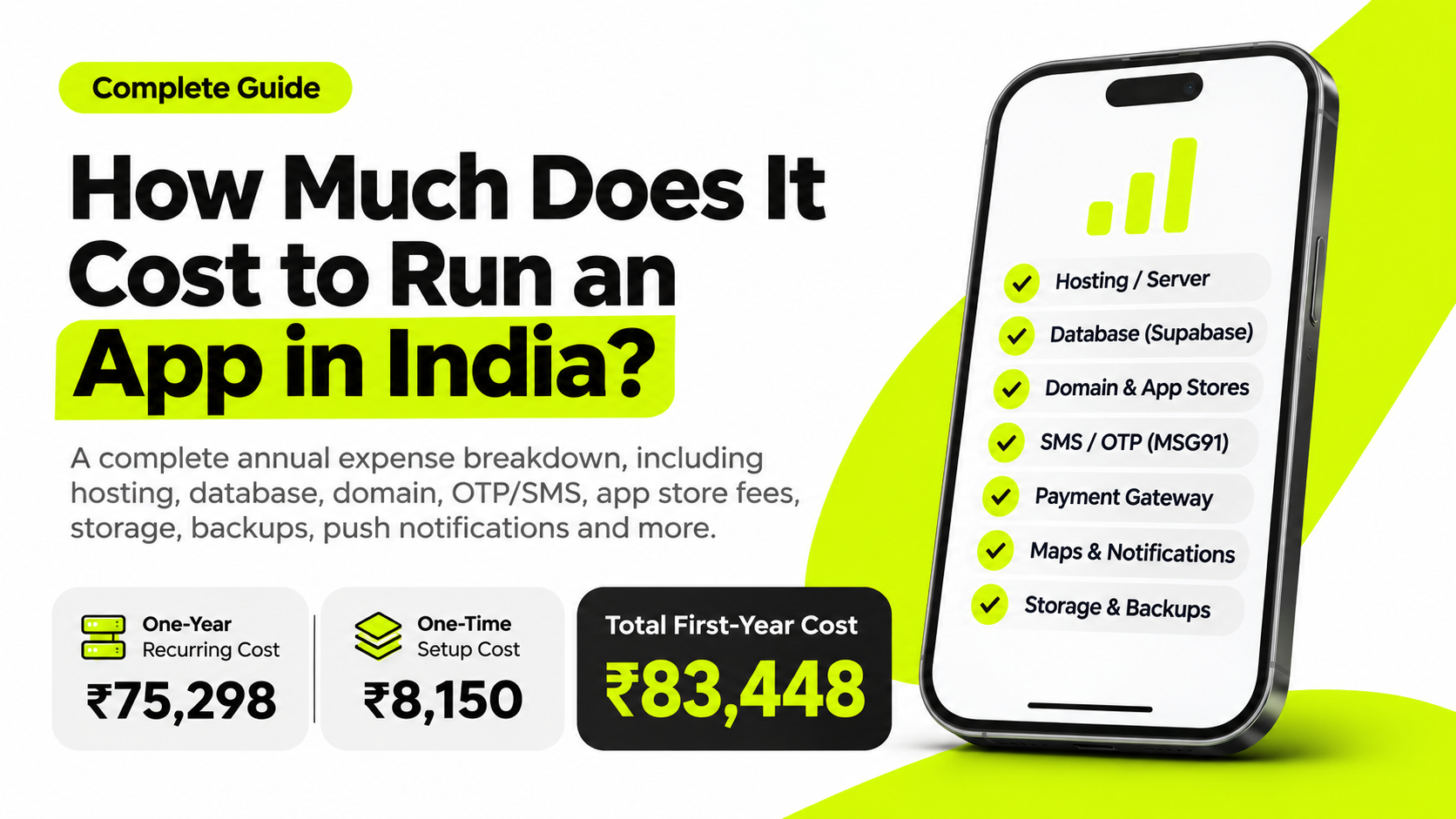
₹75,298 recurring one-year expenses + ₹8,150 one-time setup expenses.
Estimates are illustrative. Provider prices, taxes, exchange rates and actual usage may vary. Hosting and database architecture should be selected according to application requirements. Storage, backups, bandwidth and payment gateway usage may create additional charges.
Understanding the Estimate
The example above includes ₹75,298 in recurring one-year expenses and ₹8,150 in one-time setup expenses. Together, these give an estimated first-year budget of ₹83,448.
This is not a universal price for every application. For example, if your VPS hosts your database, you may not need a separate Supabase subscription. If you use Hostinger Web Hosting instead of VPS, replace the VPS estimate with the actual plan price.
Storage, backup retention and bandwidth costs should also be reviewed against your actual usage. They are not separately quantified in this example.
13. Additional Pay-As-You-Go Expenses
The calculator above does not include every possible expense. Some services charge according to how much your application is used.
- Payment gateway: Charges depend on the total value and number of transactions.
- Additional SMS: More OTPs and notifications increase messaging expenses.
- Storage and bandwidth: Large volumes of uploaded files and downloads may increase bills.
- Backup storage: Longer retention periods and separate backup storage may create additional expenses.
- Maps API: Higher API usage may increase location service costs.
- Database resources: Higher compute, storage and bandwidth requirements can increase database bills.
- Other APIs: AI, WhatsApp, video processing and external integrations may have their own usage-based charges.
For this reason, your actual monthly expenses should be reviewed against real usage rather than relying only on an initial estimate.
14. Who Should Own the Third-Party Accounts?
This is an important point that every business owner should understand before launching an application.
All third-party service accounts should be created and owned by the customer or business that operates the application.
For example, the customer should create and maintain their own accounts for:
- Hostinger or another hosting provider
- Supabase or another database provider
- Google Play Console
- Apple Developer Program
- MSG91 or another SMS provider
- Cashfree or another payment gateway
- Google Maps Platform
- Firebase and other notification services
- Email, storage and backup providers
The customer should use their own business email address, phone number and payment method wherever appropriate. The subscriptions, invoices, billing information and account ownership should remain under the customer's control.
What Does the Development Company Do?
The development company can guide the customer through account creation, explain the required plans, help configure the services and integrate the necessary APIs into the application.
Where technical access is required, the customer can provide the development team with the minimum permissions necessary to complete the integration.
The development company should not need to own the customer's third-party accounts or pay recurring service bills on the customer's behalf.
This arrangement provides better transparency and ensures that the customer retains control over their application, code, data, subscriptions and billing.
15. How Can You Reduce Application Running Costs?
You do not need to purchase expensive infrastructure from the beginning. Start with a setup that matches your actual requirements and scale when usage increases.
- Choose web hosting or VPS based on the application's actual technical requirements.
- Do not subscribe to unnecessary third-party services.
- Monitor database, storage and bandwidth usage.
- Use available free tiers where they are suitable for production requirements.
- Optimise images and files to reduce storage and bandwidth consumption.
- Monitor OTP and SMS usage to avoid unnecessary messages.
- Use suitable backup schedules and retention policies.
- Review payment gateway pricing and transaction terms.
- Keep billing alerts enabled wherever providers support them.
16. Final Thoughts: What Should You Budget to Run an App?
There is no single fixed price for running an application. A business website, a booking platform, a marketplace and a high-volume fintech application will all have different infrastructure and service requirements.
In our illustrative example, the estimated first-year infrastructure and service registration budget is ₹83,448. This includes ₹75,298 in recurring one-year expenses and ₹8,150 in one-time setup expenses.
Usage-based charges such as payment gateway fees, additional SMS, storage, backups and API consumption need to be calculated separately.
Most importantly, make sure your business owns its third-party accounts, subscriptions, application data and billing arrangements. Your development partner should help you set up and integrate the services while you retain control.
Need Help Planning Your Application?
At Next Code Company, we help businesses plan, design and develop web applications, mobile applications, marketplaces and custom software solutions.
We can help you choose a suitable technology stack, understand the infrastructure requirements and identify the third-party services your application actually needs.
Visit Next Code Company to discuss your application requirements.
Related articles
Have a story worth engineering?
We turn strategy into shipped software. Book a free consultation and we'll map the build, the timeline and the cost.